Case Study - Projects Collection
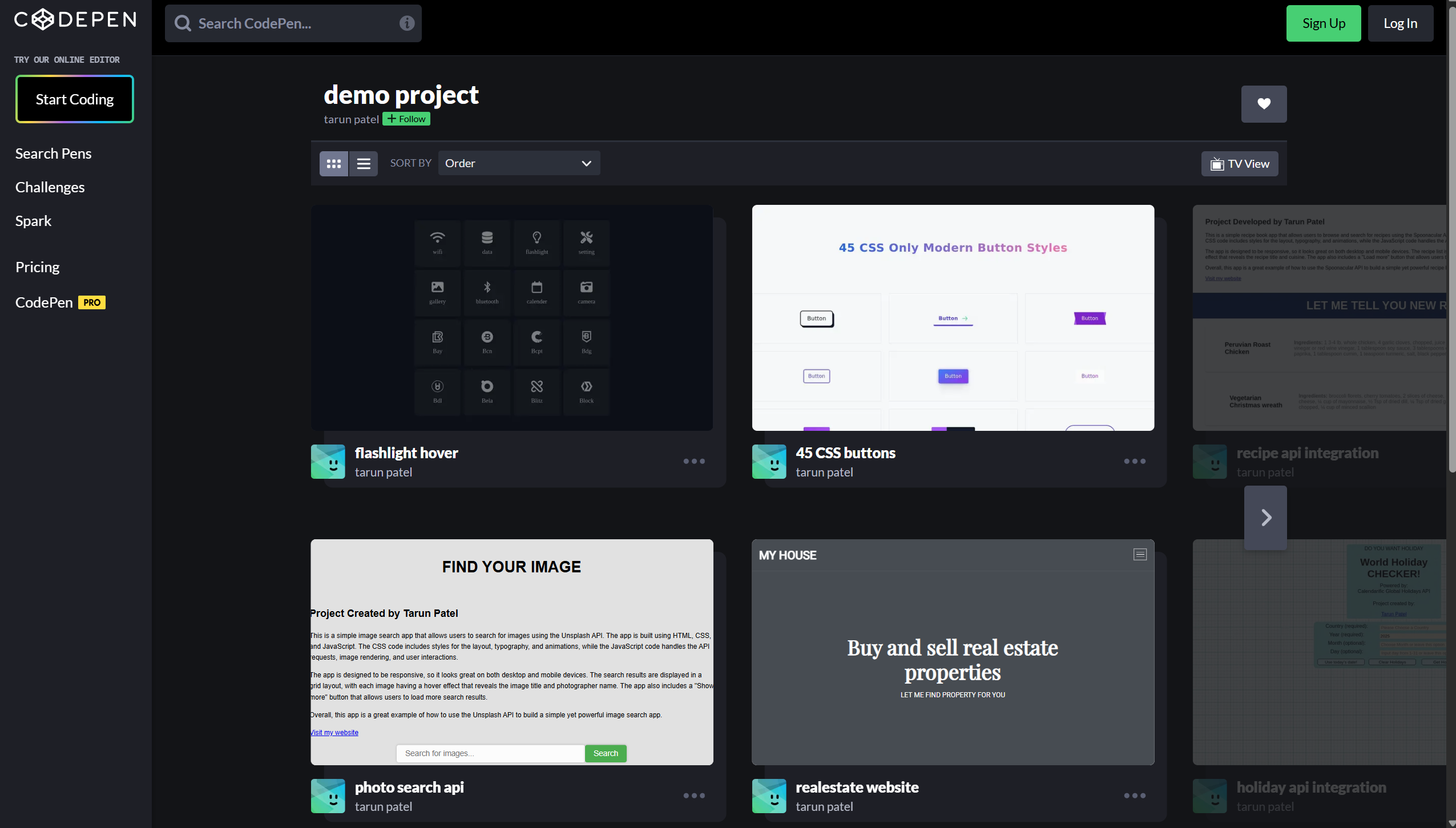
A meticulously curated collection of 15+ dynamic demo projects showcasing mastery in modern web technologies including HTML, CSS, JavaScript, PHP, and frameworks like Tailwind CSS, Bootstrap, Angular, and jQuery.
- Industry
- Web Development & UI/UX Design
- Year
- Service
- Frontend Development Showcase
About the Collection
This comprehensive portfolio represents a meticulously developed collection of 15+ dynamic demo projects that exemplify mastery across the full spectrum of modern web development technologies. Each project has been crafted with precision and attention to detail, demonstrating proficiency in core web technologies including HTML5, CSS3, JavaScript, and PHP, complemented by expertise in industry-leading frameworks such as Tailwind CSS, Bootstrap, Angular, and jQuery.
The collection serves as a living showcase of technical versatility and creative problem-solving, featuring a diverse range of engaging web applications and components. From animated loading buttons that enhance user feedback to sophisticated e-commerce landing pages that drive conversions, each project demonstrates a commitment to creating fully responsive and visually engaging web experiences that deliver exceptional user experiences across all devices and screen sizes.
Collection Highlights
Interactive UI Components: The collection includes a variety of reusable, production-ready components including animated loading buttons with smooth state transitions, interactive forms with real-time validation, captivating hover effects that enhance user engagement, and sleek carousel sliders with touch-enabled navigation.
E-Commerce Solutions: Multiple projects focus on modern e-commerce experiences, featuring responsive product landing pages with optimized conversion funnels, seamless shopping cart implementations with real-time price calculations, and mobile-first checkout flows that prioritize user convenience.
Full Applications: Beyond individual components, the collection showcases complete applications including a sophisticated music player with playlist management and audio visualization, modern real estate landing pages with property filtering and interactive maps, and responsive web applications demonstrating end-to-end functionality.
Responsive Design Excellence: Every project in the collection has been built with a mobile-first approach, ensuring flawless rendering and optimal user experience across smartphones, tablets, and desktop computers. The implementations leverage modern CSS techniques including Flexbox, CSS Grid, and media queries to create adaptive layouts that respond intelligently to different viewport sizes.
Live Demos & Source Code
All projects are publicly accessible with live interactive demos and complete source code available on CodePen, allowing developers and potential clients to explore the implementations in detail, experiment with the code, and understand the architectural decisions behind each solution.
CodePen Collection: https://codepen.io/collection/NqVPbe
Technologies

HTML5

CSS3

JavaScript

PHP

Tailwind CSS

Bootstrap

Angular

jQuery

Sass

Git
Core Technologies
Frontend Foundation: HTML5 for semantic markup, CSS3 for advanced styling with animations and transitions, JavaScript (ES6+) for interactive functionality and DOM manipulation, PHP for server-side processing and dynamic content generation.
CSS Frameworks: Tailwind CSS for utility-first styling and rapid development, Bootstrap for responsive grid systems and pre-built components, Sass for advanced CSS preprocessing with variables and mixins.
JavaScript Libraries: jQuery for simplified DOM manipulation and cross-browser compatibility, Angular for building structured single-page applications with TypeScript support.
Development Tools: Git for version control and collaboration, CodePen for live development and sharing, responsive design testing tools for cross-device compatibility.
Key Features & Project Highlights
1. Animated Loading Buttons
Interactive State Management: Sophisticated loading button components featuring smooth CSS animations and JavaScript state transitions. The buttons provide clear visual feedback during asynchronous operations, transforming from idle to loading to success/error states with fluid animations. Implemented using CSS keyframes, transform properties, and JavaScript event handling for seamless user experience.
Key Features: Multiple animation styles (spinner, progress bar, pulse effects), customizable colors and sizes, accessibility-compliant with ARIA labels, touch-friendly with proper hit targets, reusable component architecture.
2. Interactive Forms with Validation
Real-Time Validation System: Comprehensive form implementations featuring client-side validation with instant feedback, custom error messaging, and progressive enhancement. Forms include text inputs, email validation, password strength indicators, checkbox groups, radio buttons, select dropdowns, and file uploads with drag-and-drop support.
Key Features: Real-time validation with regex patterns, custom validation rules, error message positioning, success state indicators, form serialization, AJAX submission handling, accessibility features including keyboard navigation and screen reader support.
3. E-Commerce Landing Pages
Conversion-Optimized Design: Modern, responsive landing pages designed specifically for e-commerce products, featuring hero sections with compelling CTAs, product showcases with image galleries, feature highlights with icon grids, customer testimonials, pricing tables, and newsletter signup forms.
Key Features: Mobile-first responsive design, optimized images with lazy loading, smooth scroll animations, sticky navigation headers, product quick-view modals, shopping cart integration, checkout flow prototypes.
4. Carousel Sliders
Touch-Enabled Navigation: Sleek, performant carousel implementations supporting both mouse and touch interactions. Features include infinite looping, auto-play with pause on hover, thumbnail navigation, keyboard controls, and responsive breakpoints for different screen sizes.
Key Features: Smooth CSS transitions, swipe gesture support, lazy image loading, customizable transition effects, indicator dots, previous/next navigation, accessibility keyboard controls, responsive image sizing.
5. Hover Effects Collection
Creative Interactions: A comprehensive library of innovative hover effects for images, buttons, cards, and text elements. Effects include parallax movements, color overlays, zoom animations, flip transformations, slide reveals, and gradient transitions.
Key Features: Pure CSS implementations for performance, GPU-accelerated transforms, customizable timing functions, fallbacks for older browsers, reusable utility classes, documentation with code examples.
6. Music Player Application
Full-Featured Audio Player: A sophisticated web-based music player featuring playlist management, audio visualization, playback controls, volume adjustment, progress seeking, and shuffle/repeat modes. Built with the Web Audio API for advanced audio processing.
Key Features: Custom audio controls, waveform visualization, playlist creation and editing, track metadata display, keyboard shortcuts, local storage for preferences, responsive design for mobile playback, equalizer controls.
7. Real Estate Landing Pages
Property Showcase Platform: Modern landing pages designed for real estate listings, featuring property galleries, interactive floor plans, location maps integration, virtual tour embeds, contact forms, and mortgage calculators.
Key Features: Image lightbox galleries, Google Maps integration, property filtering by price/location/features, comparison tools, agent contact forms, mobile-optimized layouts, SEO-friendly structure.
8. Responsive Shopping Cart
Seamless E-Commerce Experience: Complete shopping cart implementation with product listing, quantity adjustment, real-time price calculations, discount code application, shipping cost estimation, and checkout flow.
Key Features: Local storage persistence, add/remove/update cart items, quantity validation, price formatting, tax calculations, coupon code system, responsive table layouts, mobile-friendly checkout, order summary display.
Additional Projects
UI Component Library: Reusable components including modals, tooltips, accordions, tabs, progress bars, badges, alerts, and navigation menus.
Animation Showcases: CSS animation demonstrations including loading spinners, skeleton screens, page transitions, scroll-triggered animations, and micro-interactions.
Responsive Layouts: Grid and flexbox layout examples, dashboard templates, blog layouts, portfolio grids, and admin panel interfaces.
Technical Challenges & Learning Objectives
Challenge 1: Cross-Browser Compatibility
The Problem: Creating consistent user experiences across different browsers (Chrome, Firefox, Safari, Edge) and their various versions, each with different CSS support, JavaScript implementations, and rendering engines. Ensuring that advanced CSS features like Grid, Flexbox, and custom properties work reliably across all target browsers.
The Solution: Implemented progressive enhancement strategies starting with a solid HTML foundation, adding CSS enhancements with fallbacks for older browsers, and using JavaScript feature detection before applying advanced functionality. Utilized CSS vendor prefixes, polyfills for missing features, and thorough cross-browser testing using BrowserStack and local device testing.
Challenge 2: Responsive Design Across Devices
The Problem: Designing and implementing interfaces that work flawlessly across the vast spectrum of device sizes, from small smartphones (320px width) to large desktop monitors (2560px+ width), while maintaining visual hierarchy, readability, and usability at every breakpoint.
The Solution: Adopted a mobile-first development approach, starting with the smallest screen sizes and progressively enhancing for larger viewports. Utilized CSS Grid and Flexbox for flexible layouts, relative units (rem, em, %) for scalable typography, and container queries for component-level responsiveness. Implemented fluid typography using clamp() and calc() functions for smooth scaling between breakpoints.
Challenge 3: Performance Optimization
The Problem: Ensuring fast load times and smooth interactions despite rich animations, multiple images, and complex JavaScript functionality. Avoiding layout shifts, minimizing render-blocking resources, and maintaining 60fps animations.
The Solution: Implemented lazy loading for images and off-screen content, optimized images with appropriate formats (WebP with fallbacks), minified CSS and JavaScript, used CSS transforms and opacity for GPU-accelerated animations, debounced scroll and resize event handlers, and leveraged browser caching strategies.
Challenge 4: Accessibility Compliance
The Problem: Making all interactive components accessible to users with disabilities, including keyboard-only navigation, screen reader compatibility, proper focus management, and WCAG 2.1 compliance for color contrast and interactive elements.
The Solution: Implemented semantic HTML5 elements, added ARIA labels and roles where necessary, ensured all interactive elements are keyboard accessible with visible focus indicators, maintained proper heading hierarchy, provided alternative text for images, and tested with screen readers (NVDA, JAWS, VoiceOver).
Challenge 5: Code Reusability & Maintainability
The Problem: Creating a collection of 15+ projects while avoiding code duplication, maintaining consistent coding standards, and ensuring each project could be easily understood, modified, and extended by other developers.
The Solution: Developed a modular component architecture with reusable CSS classes and JavaScript modules, established coding conventions and naming patterns (BEM for CSS), created comprehensive inline documentation, used CSS custom properties for theming, and organized code with clear file structures and separation of concerns.
Solution & Implementation Approach
This Demo Projects Collection represents a comprehensive showcase of modern web development capabilities, demonstrating proficiency across the entire frontend development stack. The solution combines technical excellence with creative design to deliver a portfolio of production-ready components and applications.
Development Methodology
Iterative Design Process: Each project began with wireframing and design mockups, followed by iterative development cycles incorporating user feedback and performance testing. The mobile-first approach ensured that core functionality worked on the smallest screens before adding enhancements for larger viewports.
Component-Based Architecture: Projects were built using a modular, component-based approach where each UI element (buttons, forms, cards) was developed as an independent, reusable component. This architecture promotes code reuse, simplifies testing, and makes maintenance more manageable.
Progressive Enhancement: All projects follow progressive enhancement principles, starting with a solid HTML foundation that works without CSS or JavaScript, then layering on styles and interactivity. This ensures basic functionality for all users while providing enhanced experiences for modern browsers.
Technical Implementation
Responsive Frameworks: Leveraged Tailwind CSS's utility-first approach for rapid prototyping and consistent spacing/sizing, while using Bootstrap's grid system and components for more traditional layouts. Custom CSS was written using Sass for advanced styling needs, taking advantage of variables, mixins, and nesting.
JavaScript Patterns: Implemented modern JavaScript patterns including ES6+ features (arrow functions, destructuring, template literals), async/await for asynchronous operations, event delegation for efficient event handling, and module pattern for code organization.
Animation & Interaction: Created smooth, performant animations using CSS transitions and keyframes for simple effects, JavaScript for complex state-based animations, and the Web Animations API for advanced timing control. All animations respect the prefers-reduced-motion media query for accessibility.
Quality Assurance
Testing Strategy: Each project underwent rigorous testing including cross-browser compatibility testing, responsive design testing across multiple devices, accessibility audits using Lighthouse and axe DevTools, performance profiling with Chrome DevTools, and code validation with W3C validators.
Code Quality: Maintained high code quality through consistent formatting, meaningful variable and function names, comprehensive comments explaining complex logic, DRY (Don't Repeat Yourself) principles, and regular code reviews.
Deployment & Sharing
CodePen Platform: All projects are hosted on CodePen, providing live, interactive demos that allow visitors to view the rendered output, inspect the source code, and even fork projects for their own experimentation. The platform's built-in editor makes it easy to demonstrate code concepts and share working examples.
Project Impact & Professional Growth
Skills Demonstration
This collection serves as a comprehensive portfolio demonstrating mastery of fundamental web technologies and modern frameworks. The 15+ projects showcase versatility across different project types, from small UI components to complete applications, proving the ability to tackle diverse development challenges.
Technical Proficiency
The collection demonstrates proficiency in HTML5 semantic markup, CSS3 advanced styling including Grid, Flexbox, animations, and custom properties, JavaScript ES6+ features and DOM manipulation, responsive design principles and mobile-first development, accessibility standards and WCAG compliance, and performance optimization techniques.
Real-World Applications
Many components from this collection have been adapted and integrated into production websites for clients, demonstrating their practical value beyond demonstration purposes. The reusable nature of the components has accelerated development timelines on subsequent projects.
Learning & Growth
Developing this diverse collection provided hands-on experience with multiple frameworks and libraries, deepened understanding of cross-browser compatibility issues and solutions, improved problem-solving skills through tackling varied technical challenges, enhanced code organization and documentation practices, and built confidence in ability to learn and apply new technologies quickly.
Community Engagement
By sharing all projects publicly on CodePen with complete source code, the collection contributes to the developer community, helping others learn from working examples. The projects have received positive feedback and engagement from fellow developers, fostering knowledge sharing and collaboration.
Professional Credibility
This collection establishes credibility as a versatile frontend developer capable of delivering polished, production-ready code. The variety of projects demonstrates adaptability and the ability to work across different domains (e-commerce, entertainment, real estate), while the attention to detail in each implementation showcases commitment to quality and user experience.
Continuous Improvement
The collection represents an ongoing commitment to learning and improvement, with projects regularly updated to incorporate new techniques, optimize performance, and enhance accessibility. This iterative approach reflects a growth mindset and dedication to staying current with evolving web standards and best practices.